Skip to content

Menu

Changelog

What's new in DineSure

Every release, newest first. The counter app shows the latest few on its About page.

  1. Version 2.2.0DineSure Counter 1.3.0Current

    Office printers flagged, and a counter that restarts offline

    DineSure Counter now tells you when a printer is an office or photo printer instead of a receipt printer. A counter restarted without the internet opens again, and bills no longer run the rate and amount together.

    New

    • DineSure Counter 1.3.0 marks an office or photo printer as "not a receipt printer" when you set up printers or add one in Settings, and does not switch it on for KOTs and bills.

    Improved

    • DineSure Counter 1.3.0 prints on an office or photo printer through its normal print dialog, so it no longer prints garbage.
    • On the bill, the rate and amount columns have more space between them.

    Fixed

    • A counter restarted without the internet opens again with the work it last had, instead of stopping at the sign-in.
  2. Version 2.1.0

    A quicker Floor and kitchen notes

    Floor tiles show what each table needs and act on it in one tap, and a table's sheet puts every action on a button. Staff can send a note to the kitchen with a KOT and give a table to a teammate.

    New

    • Floor tiles show how many KOTs are still cooking or held, or All served, and the initials of the teammate serving the table.
    • Tiles have quick actions: Print bill once every KOT is served, Reprint bill, Take payment, Close table, Mark clean and View KOTs.
    • Note in a table's sheet sends a note to the kitchen, typed or picked from Less spicy, Extra spicy, No onion, no garlic, Jain, Serve together and Rush. It prints on the next KOT and shows on Orders and the Kitchen screen.
    • Assign gives a table to a teammate. Until then the table belongs to whoever opened it.
    • Reprinted KOTs print REPRINT on top, so the kitchen knows not to cook them again.

    Improved

    • The top of a table's sheet holds the table, guests, the guest's mobile, the kitchen note and the teammate. Tap the table to move to a free table or join a running one: a table with too few seats gets a warning, and Undo shows right after a move.
    • Every order action is a button at the foot of the sheet (Hold, KOT, Bill, Reprint and Save), with Bill adjustments and Bill corrections below them.
    • Bill sends any new items to the kitchen first, then prints the bill. The sheet closes after KOT and Hold, so you are back on the Floor.
    • Pick Cash or Card and Settle takes the full amount in one tap. UPI shows its QR in place, and Part opens the panel to split the payment.
    • KOTs in the sheet lists the table's KOTs, each with its own reprint, and Reprint all.
    • When offline work cannot be applied, Try again sends it once more, beside Discard it.

    Fixed

    • The counter keeps working while DineSure restarts for an update, and comes back online by itself after a brief server error.
    • On a weak connection, a guest's QR order is no longer placed twice.
    • iPhones and iPads no longer show "Can't reach the server" after an action that worked.
  3. Version 2.0.0

    Own deliveries, guest orders and your plan

    Take orders you deliver yourselves with the customer's details, see what guests add and order at the table, and let guests find every order again. Setup now includes your FSSAI number and your plan, and new orders pause when a plan stays unpaid after its grace period.

    New

    • New order has Our delivery for orders you deliver yourselves, with the customer's mobile number, name, address, locality and a Deliver by time, recent addresses from their number, and Deliver to printed on the bill; Reports count it apart from delivery apps.
    • A takeaway can keep the customer's mobile number, and the order shows the customer's card with their visits, average bill, coins and the dishes they usually order.
    • Customers lets you tag a customer and shows their average bill, first visit and recent addresses.
    • With QR ordering, Reports has Guests: how many guests open your menu, add dishes and order, how many leave without ordering, and which dishes they add.
    • When a guest has said yes to your offers on WhatsApp, their customer page shows Added, not ordered: the dishes they added to their cart at the table and did not order.
    • Guests find every order again in My orders, from the account button on every table screen, and orders placed from their phone move to their account when they sign in.
    • While an order is in the kitchen, the guest's menu shows whether it is waiting for you, being prepared, ready or served.
    • Setup asks for each outlet's FSSAI number, has the owner choose the plan and add-ons, and sets up UPI AutoPay for the charge after the free trial.
    • Settings, Plan takes coupon codes, offers two-year plans where your price list has them, and tells you 60 days ahead when your price will rise.
    • Each restaurant you refer that starts paying earns you credit off your next charges, in place of free years of Loyalty.
    • If a plan stays unpaid after its grace period, new orders, KOTs and bills pause from the next business day, reports and past bills stay open, and Pay now turns them back on.

    Improved

    • Tapping a table on the Floor opens one sheet with categories, a menu of up to four columns and the order side by side, and Clear all removes dishes not yet sent.
    • Payment and settling open in place in the table's sheet, and guests and bill setup open from tiles beside the order.
    • Today reminds the owner of the first charge after the free trial, a coming price rise and a missing FSSAI number.
    • Dialogs darken the screen behind them, so it is clear when one is open.
    • The guest's offers switch says the restaurant also sees the dishes they add to their cart, and the separate switch for sharing dishes is gone.
  4. Version 1.4.0DineSure Counter 1.2.0

    Updates on the About page

    The About page shows whether DineSure Counter is up to date, and lets you check for updates or restart into one.

    New

    • About shows whether DineSure Counter is up to date, with Check for updates, and Restart to update once a new version has downloaded. This comes with DineSure Counter 1.2.0, which installs on its own.
  5. Version 1.3.0DineSure Counter 1.1.0

    Tickets that wait, and quicker bills

    Tickets for a kitchen computer that was offline now wait for you instead of printing late, the bill suggests guests and coupons as you type, and the counter updates itself when it is free.

    New

    • When a computer with a printer was offline, its tickets no longer print late on their own: the counter shows the tickets that waited to print, with Print or Skip for each, or Print all and Skip all.
    • On New order and while adding dishes, a note tells you when a dish's printer is on a computer that is offline, so you can tell the kitchen yourself.
    • On the bill, the Customer box suggests guests as you type a mobile number, for staff who can see customers.
    • The Coupon code box lists your live coupons, the most recently used first, and one tap applies one.
    • Dishes not yet sent stay on the ticket for up to 12 hours if the counter reloads or closes, and if a KOT was sending when it closed, the counter says so before you send again.
    • DineSure updates itself when the counter is free, and when it is busy, Update ready offers Update now. DineSure Counter 1.1.0 installs its own updates from Update now.

    Improved

    • KOTs, bills, reprints, credit notes and Test print made at the counter print on its own printers at once.
    • When a bill earns no coins, the bill, the printed bill and the guest's phone say why, and Customers marks your team's numbers with Team.
    • The counter opens on a loading screen in its own look instead of a blank page.

    Fixed

    • When the computer reports no network, KOT & print and bills no longer hang: the counter switches to working offline.
    • Orders taken offline now reach the kitchen printers on your other computers once the counter is back online.
    • A coupon now counts toward a cashier's discount limit, so a large coupon asks for a manager's approval.
    • Retry on a ticket that already printed no longer prints a second copy.
  6. Version 1.2.0

    Orders board and bills from the table

    Taking orders, billing and payment now happen in one sheet on the Floor, Orders shows the whole day on one board, and printed bills are larger and set the way you like.

    New

    • Orders shows four columns, New, In the kitchen, Running and Done today, and tapping a table's card opens it right on Orders.
    • Settings, Printing has Bill design: choose Restaurant, Cafe or Quick service, normal or large text, a line under the name and a message at the bottom, and see the bill before it prints.
    • Change a sent KOT from the table's sheet with Edit and your PIN at the counter computer, and the kitchen gets a cancellation slip.
    • Settings, Coins has Try the rules to show what a guest pays, and a bill too small for coins says why.

    Improved

    • Print bill (F9) and Take payment & settle (F10) are in the table's sheet on the Floor, where Cash, UPI, Card or Split is picked when the guest pays.
    • New order is on the Floor instead of the sidebar, and counters without tables open there with their open orders.
    • KOT & bill sends the order, prints its bill and opens the table ready for payment.
    • Printing a dine-in bill marks its KOTs served unless the kitchen display is still cooking them, and a takeaway paid at the counter stays under In the kitchen until it is ready.
    • Printed bills are larger and easier to read, with a clear table of dishes and amounts.
    • Waiting times read like 1h 41m, and a KOT left open from an earlier day shows its date.
    • On a keyboard, ← and → move between the Orders columns and Enter opens the card.

    Fixed

    • The coupon form in Settings, Billing opens again instead of an error screen.
    • Your own reasons in Settings, Billing now save.
    • Two counter computers billing offline no longer print the same KOT or parcel number.
  7. Version 1.1.0DineSure Counter 1.0.1

    Order and bill from the table

    Tap a busy table to add dishes, cancel them and open the bill, all from the Floor. These changes come from restaurants using DineSure.

    New

    • Tap a busy table to see what it ordered and add more dishes from the menu beside it. Send the KOT without leaving the Floor.
    • Each busy table on the Floor shows Bill with its amount, so the bill opens in one tap.

    Improved

    • Cancel a dish with × in the table's panel, on the bill and while adding dishes. Cancel KOT is now a clear button.
    • Before you cancel the last dishes on a table, DineSure warns that the bill becomes ₹0. An empty bill tells you to close the table.
    • Adding dishes from the bill shows what the table already ordered.
    • The bill's cancel button now says Cancel bill, since it cancels the bill, not the dishes.
    • On a keyboard, F8 in a table's panel sends the new dishes to the kitchen.

    Fixed

    • When one printer stops answering, the other printers keep printing and you no longer need to reload the counter.
    • Tickets for a printer that is off try again on their own. If they still do not print, the counter shows them as not printed, with Retry.
    • When a printer driver hangs, DineSure Counter 1.0.1 stops waiting after 25 seconds, so Retry works without restarting DineSure Counter.
  8. Version 1.0.0DineSure Counter 1.0.0

    The first numbered release

    From now on every DineSure update has a version number and a short note here about what changed. Version 1.0.0 is everything DineSure does today.

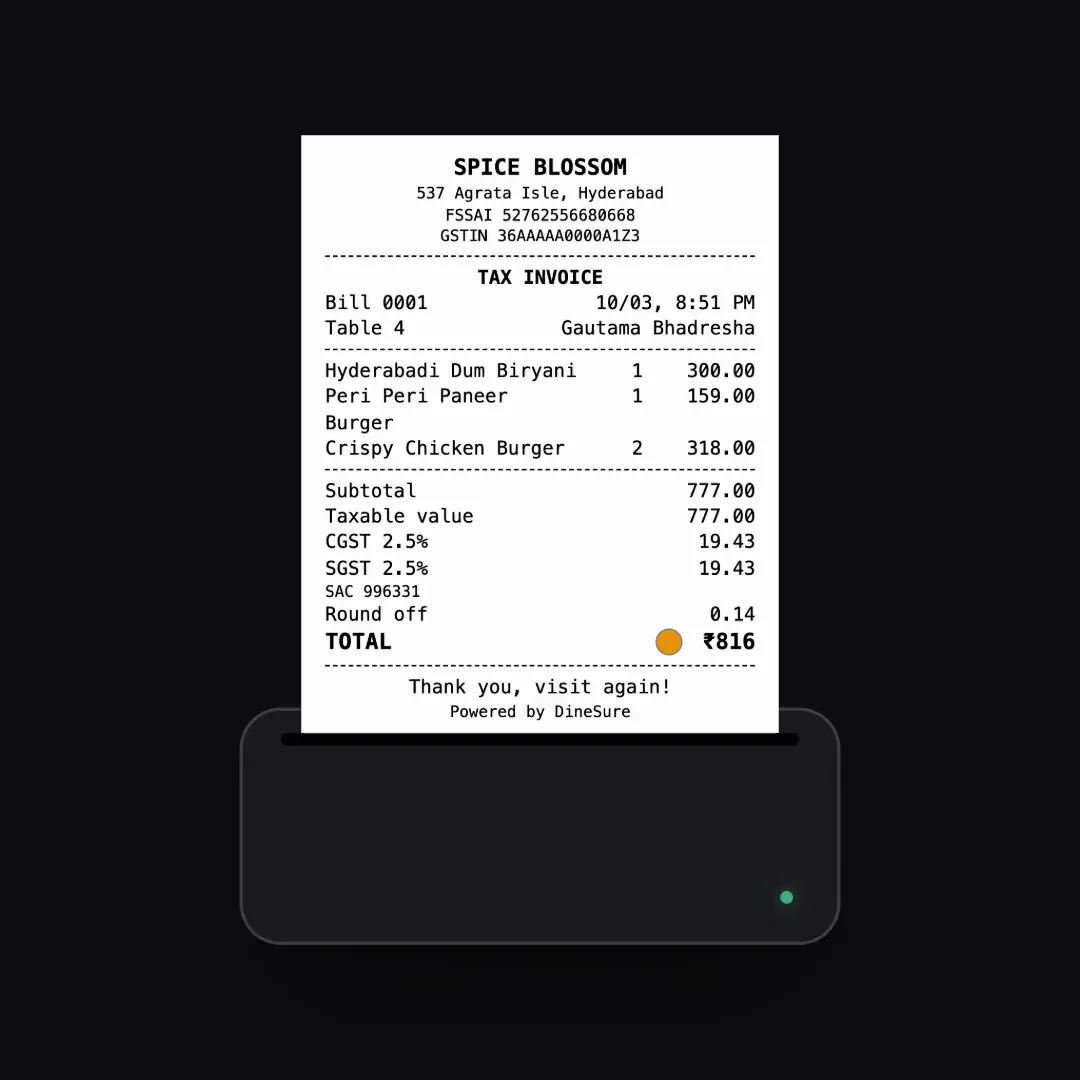
    A Spice Blossom bill printing, with GST and the total.

    New

    • Guests order from a QR code on the table, and each dish's KOT prints at its kitchen station.
    • Bills with GST, and a UPI QR for the exact amount on the bill, the counter screen and the guest's phone.
    • DineSure Counter for Windows and Mac prints KOTs and bills without a print dialog, and keeps billing when the internet drops.
    • Kitchen and token displays on any TV, tablet or phone.
    • Cash drawer, day close, and reports for any range of days.
    • Roles you can change, and approvals from the owner's phone.
    • Coins for loyalty on paid bills.
    • Sign-in codes arrive on WhatsApp.
    • This About page shows the version you are using and what changed.